Page 4 of 4

Re: New forum icons...

PostPosted: Thu Jul 23, 2009 11:16 pm
by asmodeus
makslane wrote:I don't know how to do that

Well, for me it works like this:
I just go to "Manage Forums", and I type the filename in the field behind "Forum image" in the forum settings.
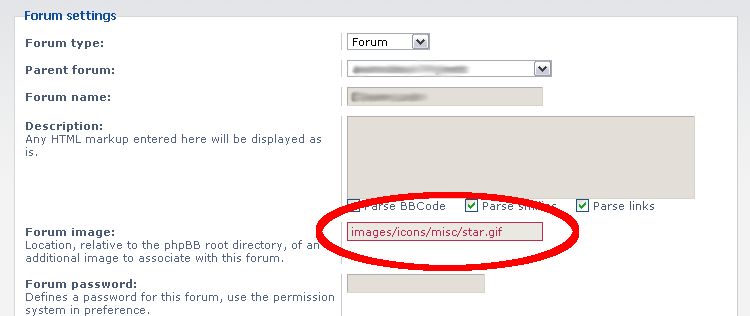
screenshot.png

When viewing the results, I have the forum image next to the icon.
Have you done it like this? Have you deleted the forum icons?

Re: New forum icons...

PostPosted: Fri Jul 24, 2009 12:33 am
by makslane
Humm, try look the forum again...

Re: New forum icons...

PostPosted: Fri Jul 24, 2009 3:54 pm
by asmodeus
makslane wrote:Humm, try look the forum again...

That's better, but no icon for an unread forum?

And what's about another icons? I've just made two new icons for read and unread:
forum_unread.png
unread forum
forum_unread.png (924 Bytes) Viewed 1267 times

forum_read.png
forum_read.png (1.84 KiB) Viewed 1267 times

Re: New forum icons...

PostPosted: Fri Jul 24, 2009 7:21 pm
by Hblade
Hey nice job they look really neat

Re: New forum icons...

PostPosted: Fri Jul 24, 2009 7:34 pm
by asmodeus
Hblade wrote:Hey nice job they look really neat

Thanks! I've drawn the circle myself, but the tik is made of a svg graphic, I've only colored the tik.

Re: New forum icons...

PostPosted: Sat Jul 25, 2009 5:47 pm
by makslane
Done, thanks!

Re: New forum icons...

PostPosted: Sat Jul 25, 2009 7:24 pm
by asmodeus
makslane wrote:Done, thanks!

I'm glad that I can help :).

Re: New forum icons...

PostPosted: Tue Aug 11, 2009 1:34 am
by Kalladdolf
Sorry to bump this post, but I think that looks just awesome now. We really managed to make this look very professional. :)

Oh, and just incase you're wondering why I've been very inactive lately, I'm in Canada right now and won't get back home until the beginning of October. So have fun and enjoy yourself and don't let me miss anything. :wink:
Bye!